
Size Guide
Understanding Mylulusstore Sizing


Description
x| * | Next-generation LED aquarium light fixture operates exclusively via the FluvalSmart App |
| * | Advanced LED helps you grow larger, more beautiful plants in your small freshwater aquarium |
| * | German-engineered LED lamp offers bright 7500K lighting and a host of smart features |
Operated exclusively via the FluvalSmart App on your mobile device, the Fluval Plant LED Nano Aquarium Light - 15W features an advanced design to help you grow larger, more beautiful, more vibrant plants in a small freshwater aquarium. This remarkably small, unbelievably powerful, German-engineered LED lamp offers bright 7500K lighting specifically intended for nano and desktop aquariums.
The Fluval Plant LED Nano Aquarium Light - 15W offers these next-generation features:
- Programmable, gradual 24-hour light cycle settings (sunrise, midday, sunset/dusk, and night) for healthy, realistic illumination for all your aquarium inhabitants
- 6 unique band waves for full-spectrum results
- Independent color control to suit your specific color needs
- 3 optional pre-set light configurations - Lake Malawi, Tropical, or Planted - for ultra-convenient habitat lighting
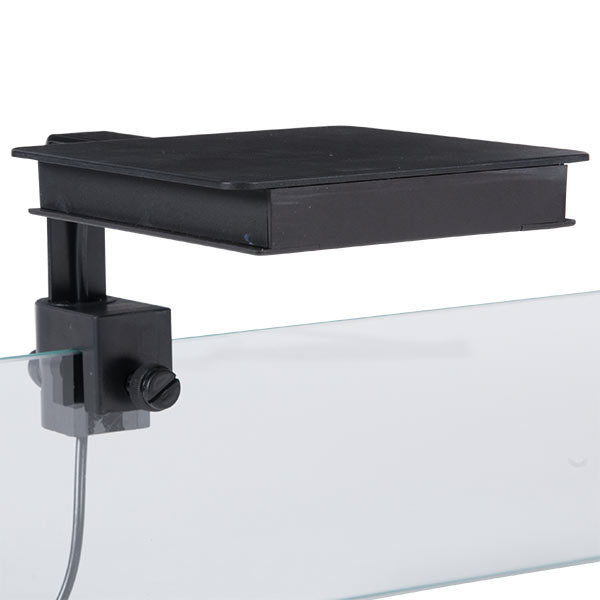
- Fully adjustable positioning (up/down, side-to-side, forward/backward) to accommodate your unique aquascape
- Over-the-glass mounting design with repositionable, secure grip
- High Luminous Efficiency (HLE) LEDs that offer improved light output and spectral quality while consuming the same power as before. HLE LEDs also feature a fully encased aluminum shell that keeps them cool to the touch and safer from water intrusion and humidity.
- A 23% lighter, smoother aluminum frame with industry leading IP67 waterproof rating, which allows mounting directly above water surface for greater light penetration and efficiency (no need to install a sliding aquarium top, which can accumulate stains and diminish light quality)
- 120° of illumination from each individual LED, for wider, deeper, more uniform coverage without dead spots
To easily control the Fluval Plant LED Nano Aquarium Light - 15W and all its built-in features, simply download the FREE FluvalSmart App on your mobile device. No additional equipment required.
Fluval Plant LED Nano Aquarium Light Specifications:
-
Dimensions: 5" x 5"
-
LEDs: 63
-
Wattage: 15W
-
Lumens: 1,000 lm
-
Color temperature: 25000K
-
Lifetime: 50,000 hrs
- Accommodates aquarium walls: 3-8mm thick
TO DOWNLOAD THE FLUVALSMART APP
Within the Google Play Store (Android users) or App Store (iOS users), search for "FluvalSmart" and install the free app.
USING THE FLUVALSMART APP
- Open FluvalSmart app on your mobile device, then select "+" to scan for all available lights within the area. Available lights will automatically appear in separate rows on screen.
- Once light(s) are listed, select checkbox at end of desired row, then select red checkmark at bottom of screen to pair with your mobile device.
- With your device now paired, select row listing your light to begin entering settings.
- Select Manual or Auto mode. Operating mode will be highlighted in white. Manual Mode allows you to enter desired color, values and memory settings. Auto Mode allows you to set a 24-hour light cycle with color intensity.
MANUAL MODE OPERATION
Enter desired color values, then press and hold P1-P4 Memory Save buttons to save up to 4 separate settings. Press power button to turn light on or off.
AUTO MODE OPERATION
-
Sunrise Mode - Select "Sunrise," enter desired start and end times, and save.
-
Daylight Mode - Select "Daylight," enter desired color settings and save. Note: Daylight values entered will reflect maximum light output for the day.
-
Sunset Mode - Select "Sunset," enter desired start and end times, and save.
- Night Mode - Select "Night," enter desired color settings and save. Note: Blue color channel represents natural moonlight.
Note: You will also find 3 pre-set light setting options (Sunny Reef, Deep Sea Glow and Color Burst).
OTHER
Paired Light Verification
Select the Magnifying Glass icon to confirm paired light. Light will blink to indicate which device is paired - particularly useful for users with multiple lights.
Renaming Lights
Select the Pen icon, rename light, and save.
General Settings
To access general operating settings (i.e. language, app version, etc.), return to main menu screen (where available lights are listed) and select "Settings."
Web
From main menu screen, select "web" to access helpful online resources.


- Choosing a selection results in a full page refresh.